I am in Vancouver, Canada right now and yesterday night the Super VanJS meetup attracted around 160 people to come and see Rebecca Murphy, Robert Nyman, Jim Andrews, Preet Jassi and little me talk about all things JavaScript.
My own talk was the last of the day and was an ad-libbed introduction to a few of the things I coded lately wrapped in a request to reclaim HTML5 as JavaScript developers. The audio of the talk is available on archive.org:
<audio controls="controls" style="display: block; margin: 1em;"><source src="http://www.archive.org/download/ReclaimHtml5/ReclaimHtml5.mp3" type="audio/mp3"></source><source src="http://www.archive.org/download/ReclaimHtml5ogg/ReclaimHtml5.ogg" type="audio/ogg"></source></audio>
The links to the demos I talked about are available here and here is a gist of what was covered:
I started by explaining my confusion about Supervan JS as Supervan is a terrible movie from the 70s with very interesting cover and back sleeve art and even more awesome posters.
I then continued to explain my unhappiness about the decline of HTML5. With this I meant that there are lots of marketing demos of HTML5 using a lot of technologies that are actually not HTML5 or use it in a very Flash-intro-ish way. I showed just how annoying it is to play Angry Birds online and how the recent Cut the Rope port looks much smoother. I also pointed out that none of them really use the web to their advantage by for example have feedback mechanisms or allow for level editing.
In essence I wanted the audience to think about bringing HTML5 into the “boring” world of day to day deliveries instead of just games and showcase sites. For this, I showed a few code examples and explained how they can benefit from HTML5 features.
I showed how to move an element to the current mouse position and how you can make this faster by using CSS translate instead of left and top using translateZ(0) to trigger hardware acceleration even when you don’t go 3D. I then showed that you can move things smoothly by adding CSS3 transitions instead of writing a JavaScript animation.
I continued introducing the 3D CSS maker, a tool to play with CSS 3D translation and animation that generates code for you.
The blue beanie maker was next showing how you can use drag and drop to put an image into the browser and manipulate it with Canvas.
The image cropping with canvas demo shows how you can enhance the functionality of browsers without having to write and install extensions. In it you can get a bookmarklet to crop any image on the web in the browser by double-clicking (in Webkit and Opera) or with a context menu (in Firefox).
I then continued to show a demo of less obtrusive video overlays showing how you can add hints for overlays on videos by reading data- attributes in the HTML and reading the current time of the video.
The last demo was a simple game with a an HTML twist that showed using canvas for game animation, touch, orientation and keyboard events to control a game paddle and how to read the necessary game data from HTML and thus making it easy to rebrand and change the game.
I ended with a plea to try some of these things out and play with all the cool APIs and hooks browsers provide us with these days instead of relying on frameworks and libraries for everything or build for one single environment. HTML5 is there for developers, if we allow only marketing people to play with it we do a disservice to ourselves.
I will follow up this with in-depth posts on hacks.mozilla.org and we also shot videos of the talks which will (quality permitting as there were some issues) be released soon.
All in all I had a great time, got lots of good questions and enjoyed the event a lot. Seeing that Vancouver is only a 2 hour flight from the valley there is a big chance I will be back soon.

Canvas is a new HTML5 element which creates a digital “drawing board.” A web developer can use one of these drawing boards along with some JavaScript to create simple shapes, graphs, animations, interactive games, and more. Recently, eighteen creative minds showed us just how powerful and important Canvas is by sharing their work in the November Dev Derby.
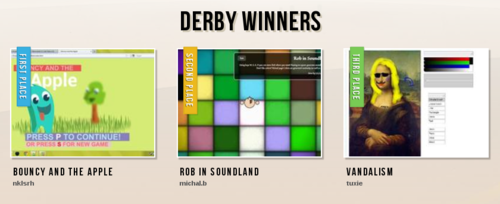
Once again, this was a fairly close race, so join us in congratulating the winners:

1st Place: Bouncy and the Apple – Canvas by nklsrh
2nd Place: Rob in Soundland by michal.b
3rd Place: Vandalism by tuxie
Runners-up:
Jump the Wall by avnishkgaur
Cirplosion by Awesome
Thanks to everyone who participated in the November and December Dev Derbies! We love your demos. In the days ahead, we’ll be rounding up the votes on December’s IndexedDB submissions. Now’s the time to get your January Orientation demos built and submitted. Can’t wait to give them a spin (or a tilt).
REMINDER: We recently updated our Dev Derby rules to allow developers to participate in multiple contests until they win 1st place. That means if you’ve submitted awesome demos and come up short in the past, you still have a chance to win that top spot in future Dev Derbies… so keep those demos coming!
Browsers need to overhaul their privacy settings to account for things like localStorage and bring control back to the user. In the days of cookies it was relatively simple for a user to wipe any identifiers (excluding IP address) from their browser. Simply clear cookies.
Firefox has two basic abilities, you can clear cookies, or you can browse and delete cookies. That’s great but not terribly clear that there’s more than cookies.

Chrome as far as I know has no cookie browser like Firefox has, but (edit: Erunno notes in the comments you can via chrome://settings/cookies) explicitly lets you “Delete cookies and other site and plug-in data”. That’s pretty good.

Today, I think Safari’s UI is the closest to perfect. Each hostname shows exactly what it has. My only gripe is that Safari doesn’t let you see what’s there. That’s a “power-user” feature however and I think it does an adequate job regardless.

Websites use more than just cookies these days. I discussed this a little over a year ago. The reason evercookie is controversial is that browsers don’t quite give users the level of control (real or perceived) that they expect for objects other than cookies.
Here is another use case for why this is needed. Google Analytics is used on perhaps half the internet’s websites. It sets a cookie every time. That means 230 bytes added to every http request for a lot of websites. Google could switch to localStorage and free up that 230 bytes. While they technically could do this, in practice, this could create a firestorm of attacks against them. The problem is it would be spun as Google trying to evade cookie deletion and and a privacy violation. The same storm that evercookie created. I suspect that’s why it hasn’t been done to date. The truth is the Google Analytics team has done a lot for improving performance including making it entirely async. But this move would be controversial.
It’s no longer about “cookies”, but “user data”.
Listen, I'm really happy that companies are trying to phase out Flash, especially Google doing it with Youtube since it's the number 1 video site on the Internet, but I must say that the HTML5 video is just bad compared to the Flash version. I wouldn't say it's awful outright, but it's definitely outclassed by flash.
I know it's still early with HTML5 on there, but I really hope they manage with some of the performance lag, loading issues, and other bugs with the player. I'm ready for an HTML5 future, but we got to iron out the kinks first.
Browser wars is a popular (and retro!) topic these days. In this post I’ll discuss another kind of browser war that I’m afraid all browsers are at risk of losing.
One side-effect of a richer web experience with html5, Javascript and CSS is that it becomes increasingly harder for web browsers to stop bad web design practices for the benefit of the user. Firefox is known for putting the user’s needs first and pioneered mainstream use of features designed to make the web experience better for users – the pop-up blocker is perhaps the most notable example.
Features like the pop-up blocker were not designed for web developers — they were designed completely in the interest of users, who were fed up with annoying ads that popped up over and under the web page you were currently visiting. This effectively forced web designers to adjust their practices and keep the users’ interests more prominently in mind. I think this is a wonderful example of how web browsers can change the web for the better. Before the pop-up blocker, web designers were dictating how their web sites should behave, and users had no other choice but to put up with it.
There are of course many other examples of when browser features have helped tame annoying web design practices, such as scrolling text in status bars, disabling the context menu when right-clicking, and blocking third-party cookies — the general theme is that the browser balances the sometimes bad urges of web developers and designers with the actual needs of the user. And as a result, the web becomes a better place. Mozilla has its own spin on this that captures the essence of Firefox: Firefox answers to no one but you.
The yellow pop-up blocker info bar in Firefox. A rare sight these days.
Today, however, you don’t see the little pop-up icon
in the location bar of Firefox very often anymore. This is because “true” pop-ups, (in the traditional/technical sense) are no longer common. It used to be that, in order to display a pop-up, web developers had to use Javascript methods like window.open to tell the browser that it wants a new window to be open so the (usually annoying) ad could be shown.
Back in 2004, when Firefox was first launched, window.open was the way of displaying pop-ups. These kinds of pop-ups are trivial for Firefox to detect, since the web page creates a separate browser window for the ad (this usually happens when a page loads, or at some other event which is straightforward enough for a browser to determine that it isn’t explicitly requested by the user).
Today, most modern web sites have become smarter and use more sophisticated technologies to display pop-up ads embedded within the web page triggering the ad. In fact, a quick anecdotal survey shows that most large, international websites have completely stopped using the traditional pop-ups. You can still find them on smaller or more local websites though (for example, Swedish news sites like aftonbladet.se are typically a year or two behind the more recent web page practices used on websites from the US in general, and the Valley in particular). The original pop-up blocking implementation certainly still matters, but its relevance is decreasing.
New websites use all sorts of clever (and highly annoying) tricks to make sure their ads are not missed by anyone:
All of these types of web ads have one thing in common: it’s next to impossible for web browsers to block them. These ads are, from a technical point of view, integral parts of the web page itself, and as such they’re indistinguishable from the “good” content on the page.
Where do we go from here?
Web browsers make at least a bit of an effort to block advertisement today with their aged pop-up blocker feature, but it’s also clear that they are not able to block all attempts of displaying advertisement on the web. (And should they? Unless we can create a world where advertisement is not just generally unwanted, but also not necessary to make the online economy spin, I would say we probably shouldn’t try to block them all. But that’s a much deeper discussion than I’m aiming for in this blog post.)
More importantly, however, web browsers are no longer stopping bad design practices. Showing an ad as a splash overlay covering the entire page and blocking the user from seeing the actual content of the page is exactly the kind of thing that Firefox effectively stopped in 2004 — but so far there is no solution in place in any web browser on the market to stop the new pop-up behavior that is at least as bad as the traditional pop-ups.
Taking a step back, what is the role of the browser in this new world where web pages are becoming more like web applications that live a life on their own terms? How can we ensure that the browser still acts as a balance that puts the user first? Of course, I don’t have the answers to these broad questions, but it’s definitely something I think must be discussed.
Contents |
What’s that exactly? (Pike)
String freeze is a bad name for the day when we start to work towards shipping the localized versions. It’s got less to do with not changing the ascii chars in locales/en-US. Basically, starting at the day of string freeze, we’ll allow localizers to say “we’re good to ship this”, independently of what lands in the code. So any new landing after that needs to make all our versions better, localized or not. Remember, almos 50% of our users are on non-en-US builds.
Common pitfalls and myths:
Suggested format:
Please keep your update to under 2 minutes!
Last week:
Next week:
Last week
This week
Need feedback
Last week
This week
This week (in progress):
Next week:
Blockers:
Done:
Next:
Done:
Next:
Last week:
This week:
Blocking Issues:
Last week
Next week
Done:
Next:
This week:
conveniently on PTO today
Last Week
Submitted a series of UX / graphics bugs. See Madhava’s list above
This Week
Assisting on bug fixing when required.
Blocking:
« previous week | index | next week »
Planning Meeting Details
Video/Teleconference Details – NEW
Contents |
Release (1.4 -> Firefox 9, 10)
Stabilization (1.5 -> Firefox 10, 11)
Development (1.6 -> Firefox 11, 12)
The Tizen initiative made an alpha release of the source code for the Tizen operating system, along with fairly detailed documentation of the Web API layer. Intel has now also officially joined as a member of the industry consortium.
In related news, Nokia purchased feature phone OS vendor Smarterphone this week.
Sencha made an interesting blog post about their 2012 wishes for HTML5. They ranged from better support for media devices, improved audio support, better caching, a contacts API. Their number one wish was for a better mobile browser debugger.
It’s still not clear whether or not Microsoft is going to support “legacy” Desktop apps on ARM-based hardware (i.e. tablets). There are conflicting screenshots from demos and Microsoft has not yet made an official announcement on the matter.
Microsoft also made a detailed blog post about the upcoming support for additional OpenType features in CSS: options such as kerning, superscript and subscript, ornamental swashes, etc. Firefox had previously been the sole browser to support this since version 4.
Opera launched the Opera TV Store, an HTML5-based store solution for connected TVs, available for OEMs, developers and content providers. The solution includes an emulator and dedicated developer tools, and can be deployed on any set-top box, Blu-ray player or HD Ready TV.
Forrester Research predicts that Apple’s enterprise sales will increase 58% to $19b this year, and will double that again in 2013.
The latest beta releases for Google Chrome have two important new features. Dynamic pre-rendering, based on heuristics and locally-stored data, of pages. When the browser is strongly confident that the user will click a particular link, it will preload and render the page. Another feature is that .exe and .msi downloads will automatically be scanned for viruses and trojans.
The latest beta channel for Chromebooks also offers support for OpenVPN connections.
Summary below, full update here and in your inbox.
Every week I post an overview on what’s been happening in the mobile (browsing) world and is relevant to Mozilla.
Opera launched the Opera TV Store, a HTML5-based store solution for connected TVs, where developers can create and publish Web-based TV apps. The store solution’s value proposition is described as “uniting multiple devices with a single, powerful browser engine.” Opera also made a partnership with the Digital Living Network Alliance, an organization who works on standards and solutions for sharing digital content across different consumer devices.Opera will integrate the company’s solution into its Devices SDK, to allow the creation of multiple device management features. Opera also announced a licensing deal with INTEK Digital, a set-top box manufacturer, to include the Opera Devices SDK on the company’s Android-based Hybrid TV product, to launch in the first half of 2012.

The Dolphin browser on Android was updated to version 7.3. Improvements include a refreshed look of the browser chrome and its Webzine feature. Mobotap also released version 3.0 of the Dolphin browser on iOS, which also got its design updated.

Lenovo and Intel announced the first Intel-powered Android smartphone: the K800. The device uses the Medfield chip mobile platform, probably with an Atom Z2460 1.6 GHz processor. The phone will be available in China in Q2 this year.

Samsung, the world’s biggest technology firm by revenue and largest smartphone producer by volume, announced good preliminary results for Q4, with sales of smartphones rising to 35 million devices, up from 28 million in Q3. The company is predicted to sell 170 million smartphone this year, up from 95 million in 2011. Not all of Samsung’s devices run on Android, but the vast majority does.

Sony announced the first Sony Android smartphones that will launch under the brand after the buyout of Ericsson’s share from the joint venture. The smartphones will be part of the Sony Xperia NXT series, which will start with the Xperia S phone, and will launch in the first quarter of this year featuring Gingerbread, to be updated in Q2 to Ice Cream Sandwich.

HTC, the second largest Android OEM and also Asia’s second-largest smartphone maker, has seen its profits decline for the first time in 2 years. Its income in Q4 of 2011 dropped by 26%, on account of competition from Samsung, as well as a decline in operating margins. For Q1 of 2012, it is estimated that the company’s shipment numbers will continue to drop to 8.5 million, after having reduced from 13.2 million in Q3 of 2011 to 10 million in Q4.

In 2012, phone makers will ship 1.67 billion units worldwide as consumers in emerging markets upgrade their handsets, with 3G and 4G devices making up more than half of total mobile phone market for first time, a report from ABI Research reveals.

16 of the top 25 mobile companies by revenue are network operators, reveals a report by analyst Tomi Ahonen. Among the rest are 5 handset manufacturers and 3 network equipment producers. The top is dominated by mobile carriers: China Mobile, with revenue of $77 billion in 2010, followed by Verizon (72 billion), Vodafone (66 billion), AT&T (58 billion), Telefonica (55 billion), T-mobile (48 billion) and Orange (47 billion), and followed by 3 handset manufacturers: Nokia (45 billion), Apple (42 billion) and Samsung (40 billion). Regional distribution puts 9 of the biggest mobile companies by revenue in Europe, 9 in Asia, 6 in North America and 1 in Latin America. Country-wise, 5 are from the US, 3 from China, 3 from Japan, 2 from South Korea and 2 from France.

Nokia confirmed the release of the Lumia 900 device in the US, which will feature a 1.4 GHz CPU with 512 RAM and a 4.3 inch AMOLED screen. This is Nokia’s first Windows Phone equipped with LTE technology, and it will run on AT&T network. At CES, Stephen Elop emphasized Nokia’s commitment to the North American market, with products, such as the Nokia 900, designed specially for it. Pricing and timing of the device were not yet announced.

Nokia has acquired Smarterphone, a Norwegian company that builds a licenseable mobile operating system for feature phones, specifically for the $25 to $75 segment. In related news, rumours are yet again surfacing about an acquisition of Nokia by Microsoft.

IE10 Platform Preview 4 includes support for a new CSS property,
-ms-user-select, which makes it easier for Web developers to
control exactly what text can be selected on their Web sites. If you were to watch me all day at my workstation, you would notice that as I read
on the computer, I select text. I’m not the
only one who
reads like this; selecting text on the Internet is important in many other scenarios.
Consider a typical news Web site. Most pages will include a news article, the contents
of which the user needs to be able to select because they read by selecting text
or because they want to share the content. Also on the news Web page there are some
menus and links to other parts of the site. Users likely don’t need to select these
items. Using -ms-user-select, the Web developer can specify that text
selection is allowed in the news article but not allowed in the menus.
The IE Test Drive site includes an example that does this.

Setting -ms-user-select:none on the entire page and then setting
-ms-user-select:element on the element containing the blog post allows only
the contents of the blog post to be selected. -ms-user-select:element
is a new property first introduced by IE which we think could be useful in many
situations. Setting -ms-user-select:element means that the user can
select the text of that element, however, the selection will be constrained to the
bounds of the element. People who want to select the contents of a news article
probably don’t want to select the footer elements just past the article. Setting
-ms-user-select:element makes it easy for users to just select the
contents of the article without having to worry about getting the mouse placement
exactly correct.
-ms-user-select accepts four values:
text – the text is selectableelement – the text is selectable, constrained to the bounds of the elementnone – the text is not selectableauto – if the element contains editable text such as an input element or contenteditable
element, the text is selectable. Otherwise selection is determined by the parent
node’s value. auto is the default value for -ms-user-select.
A developer can turn off text selection by setting -ms-user-select to
none. In IE, when text is set to -ms-user-select:none, the user will not be able to
start a selection within that block of text. However, if the user started selecting
text on a different area of the page, the selection would continue into any area
of the page including areas where -ms-user-select is none. In Firefox, if the developer
sets –moz-user-select:none then selections can’t start in that area and also can’t
be included in any other selection. In Webkit, setting –webkit-user-select:none
will make it appear as if that the text is not included in the selection, however
if you copy and paste the content, you will see that the content is included in
the selection.
user-select was originally proposed in the
User Interface for CSS3 module; this module has since been superseded by
CSS3 Basic User Interface Module, yet it does not define the property. Both
Mozilla and
Webkit support their own prefixed versions of this property. However, as
discussed above, there are some differences in the implementations.
Play around with the examples on the IE Test Drive site and let us know what you think.
—Sharon Newman, Program Manager, Internet Explorer
Microsoft released an HTML5 version of Cut The Rope which is pretty cool. Unfortunately they use Flash audio by default for Firefox users because, they say, "some Firefox users could have run into an audio problem but will notice we fall back to a flash plugin to ensure that sound effects and music will work." They don't mention specific Firefox bugs (although they do for Chrome), and when I try the HTML5 audio version it works fine for me. So, please try the HTML5 version in Firefox (release or nightly), and if it doesn't work let me know and file bugs! Thanks!
For some time now, we’ve been using various technologies to edit and store text within a web browser. Now with the contenteditable attribute, things have got a whole lot easier. In this article, I’ll tell you what this attribute is for, how it works, and how we can take things further.
First, let’s check out the spec:
The
<footer>— WHATWG</footer>contenteditableattribute is an enumerated attribute whose keywords are the empty string, true, and false. The empty string and the true keyword map to the true state. The false keyword maps to the false state. In addition, there is a third state, the inherit state, which is the missing value default (and the invalid value default).
The contenteditable attribute was mainly intended for providing an in-browser rich-text or WYSIWYG experience. You’ve likely seen this sort of thing in blog-based authoring tools like Symphony or sites like Flickr where you can begin editing page content simply by clicking in a given area.
As mentioned above, contenteditable has three possible states:
contenteditable="" or contenteditable="true"contenteditable="false"contenteditable="inherit"When you add contenteditable to an element, the browser will make that element editable. In addition, any children of that element will also become editable unless the child elements are explicitly contenteditable="false".
Here’s some example code to get us started:
<figure><div id="example-one" contenteditable="true">
<style scoped>
#example-one { margin-bottom: 10px; }
[contenteditable="true"] { padding: 10px; outline: 2px dashed #CCC; }
[contenteditable="true"]:hover { outline: 2px dashed #0090D2; }
</style>
<p>Everything contained within this div is editable in browsers that support <code>HTML5</code>. Go on, give it a try: click it and start typing.</p>
</div>
<figcaption>Putting it together</figcaption>
</figure>
</section>
<section id="live-examples">
Here are two basic-but-live examples showing what you can do with contenteditable.
Everything contained within this div is editable in browsers that support HTML5. Go on, give it a try: click it and start typing.
I’ve used CSS to create an obvious visual cue that this area of text is different from the rest. Note that I’ve future-proofed this with <style scoped>, which I covered in my previous article.
Chris Coyier of CSS-Tricks pointed out that you can let your users edit the CSS in real-time. Because the <style> element is set to display: none by the user agent, we need to set it to block for this code to work.
Try editing the CSS below:
Browser support for contenteditable is surprisingly good:
| Browser | Version |
|---|---|
| Chrome | 4.0+ |
| Safari | 3.1+ |
| Mobile Safari | 5.0+ |
| Firefox | 3.5+ |
| Opera | 9.0+ |
| Opera Mini/Mobile | N/A |
| Internet Explorer | 5.5+ |
| Android | 3.0+ |
We have to give credit where it’s due and point out that Internet Explorer has supported this attribute since IE5.5. In fact, a very early iteration of contenteditable was designed and implemented by Microsoft in July 2000.
For a more in-depth compatibility table, visit When Can I Use….
</section> <section id="storing-changes">For this section, I went straight to Doctor Remy for help, as he is much more knowledgeable than me when it comes to storing your data everything.
</section> <section id="conclusion">Depending on the complexity of your editable block, your code could be listening for the enter key (keyCode 13) to save the changes, and the escape key (keyCode 27) to undo the changes.
When the user hits enter (assuming it’s a single line of editable content), it would grab the innerHTML of the editable field and send an Ajax post to your server with the change.
A simple example of this can be seen on JS Bin: contenteditable saving to Ajax
<footer>— Remy Sharp</footer>
We’ve repeated the phrase “paving the cowpaths” all over this site, and I’m mentioning it again with the introduction of the contenteditable attribute. The spec finally makes official something that’s been implemented by browser makers for years.
Although this is one of the lesser-known new attributes, I bet you’ll find yourself using it more often than you would think.
Imagine being able to simply click a block of content and start making changes instantly: making quick corrections to an article in-place, allowing users to edit their comments, or even building spreadsheets within company applications that aren’t hooked up to any sort of back-end user interface.
If you can think of other uses for this attribute, then head on down to the comments section and tell us where else you think this could be implemented.
</section> <section id="related-reading">The contenteditable attribute originally appeared on HTML5 Doctor on January 10, 2012.
While I was in San Francisco for the last Event Apart of the year in December, Luke pulled me aside while he was preparing for his A Day Apart workshop on mobile web design. As befits the man who literally wrote the book on web forms and also wrote the the book on mobile-first design, Luke was planning to spend plenty of time covering input on mobile devices and he wanted my opinion on one of the patterns he was going to mention.
Let’s say you’ve got your typical checkout form asking for credit card details. The user is going to need to specify the expiry date of their credit card, something that historically would have been done with select elements, like so:
With the introduction of the new input types in HTML5, we can now just use input type="month".
That’s particularly nice on mobile devices that support input type="month" like Mobile Safari since iOS5.
But the behaviour on non-supporting browsers would be to display just like input type="text" …not ideal for inputting a date.
So the pattern that Luke proposed was to start with the traditional double drop-downs for month and year, and then use feature detection to replace them with input type="month" in supporting browsers.
That was an angle I hadn’t thought of. Usually when I’m implementing new HTML5 input types (like input type="number") I put the new type in the markup and then try to come up with JavaScript polyfills for older non-supporting browsers. In this case though, the old-fashioned way is what goes in the markup and JavaScript does the enhancing for newer browsers.
The only downside is that some the desktop browsers that do support input type="month" do so in a way that—from a UI standpoint—seems like a step backwards from simply having two selects: Safari displays it with a spinner control like input type="number", while Opera shows an entire Calendar (days’n’all).
Anyway, I threw a quick hack together as a proof of concept so you can see it in action. I’m sure you can improve upon it. Feel free to do so.
<script src="https://gist.github.com/1474170.js"></script>Tagged with forms html5 input javascript code scripting progressive enhancement markup mobile
The developers of the puzzle game Cut The Rope have ported their code from Objective-C to Javascript and HTML5.
And, despite the IE slant, the game works really well in Firefox! Check it out:
So it has been a busy and life changing year that just went by. 2011 brought not only a number of new events, and friends, but also a new look on the world around me. It has been fun, and I hope that it is an indication of things to come over the next year, and beyond (no, the world is not going to end).
What have I done in 2011 then? Well here is a list of some of the key things I have done this year (in my opinion):

This was a large part of my 2011 year. I spent a lot of time and effort on it and I hope to find the time to continue working on it in 2011. Affero (the Latin word for “contribute”) is a community contribution wizard that was developed as part of my A-Level course. It aims to make getting people involved in a community easier for those trying to choose where in the community they want to help out. I spent almost my entire final year of college working on it and it took up the first two months of 2011. There have been a number of posts about it, in fact so many that it even has its own category here on this blog.
Written in PHP and JavaScript it taught me a lot about not only how to develop, and properly document a project, but also a lot about Mozilla and how people feel while trying join Mozilla.

Next up in 2011 was the launch of Firefox 4. This was a big move forward for not only the web but also for myself. It was the first time I threw myself in at the deep end and organized not only the Firefox 4 Launch Party but also the first Mozilla UK meet, I also learned never to try to do both on the same day.
So on Thursday 21st April 2011 we here in the United Kingdom were graced with a wonderful (even if I do say so myself) party in our (well England’s) capital, London. However the party started well before… in fact it started weeks before, with the creation of the Firefox 4 Launch Team, the launch of Firefox 4, and then the launch of Firefox 4 Mobile. Without these three things there would be no reason for the party at all!

Well… this was a big time for me, not so much an interesting one but an important one. This was the time that I spend, gone for quite some time from the land of the internet. This was when I was doing my final A-Level exams. These I later found out, were good enough to get into my preferred university, though I will come to that one later.
Nothing much happened… I worked a lot, saved a large amount of money, then spent it all on a new computer… oh… and I got accepted by the University Of Kent!!!
In the summer I had planned to do a large number of things that never got done and for that I apologise. I did intend to get some updates made to Affero as well as create a tool to track the exposure of hashtags on twitter (about 60% there but not complete). I also wanted to re-write MozHunt and get that out properly with some nice new web technologies that fall under the HTML5 banner. Unfortunately all I have managed to do is drop off the grid even more than when I was taking my exams.

This was my first full month at university… I did a number of things such as start my course at university, make a whole new bunch of friends, and join a few societies. I even did a presentation as a Mozilla Rep on who Mozilla are, what we do, and why we do it. I also helped out a little with the planning of the Mozilla Festival, as well as write a post on how I got involved with Mozilla.
Not only was this month a big change for me (spending my first month away from home) but it was also a big month in history. This was the month that the world lost a great man who not only changed the world of tech, but also of animation. Steve Jobs.
“Your time is limited, so don’t waste it living someone else’s life. Don’t be trapped by dogma — which is living with the results of other people’s thinking. Don’t let the noise of others’ opinions drown out your own inner voice. And most important, have the courage to follow your heart and intuition. They somehow already know what you truly want to become. Everything else is secondary.”

Okay… now I know I have said several times things along the lines of “this was a big month”, well they all pale in compare to November. This is defiantly the highlight of my year. Organizing a party… that was amazing. Moving to university, life changing. Though neither of these compares to the time I had over the course of two weeks in November. Not only did I get to go to the Mozilla Festival in London, and during the evening of the second day home to Lewes for Bonfire, and making myself ill, and very tired, BUT I also got to go to MozCamp EU in Berlin! I have no idea how my luck got so good but these two events are the best two events I have been to all year, and I loved every single second!
Nothing much happened this month. This time I mean it too… I came home from University, and spent the holiday so far with family. Now onto the present?
So nothing much is happening now, I am sat at home, watching… well right now Torchwood, writing this post. So what is it I am planning on doing? Well in late January I am going to be running a little meetup in Canterbury. Oh and come Easter there will be a BarCamp in Canterbury too… and I will be there representing Mozilla. I also plan on working a little more on Affero, as well as on a few new ideas I have had.
What about resolutions… well I have none of those… I never manage to keep them so why bother… instead, I am going to give you my list of New Year wishes for 2012 (thanks for the idea Chris).
This year I wish…
Happy new year everyone! We made great progress in standardizing the platform in 2011 and plan to continue doing just that with your help. You can join our mailing list to discuss issues with web development or join IRC if you prefer more lively interaction.
I will be taking the remainder of the month off and as nobody has volunteered thus far, WHATWG Weekly is unlikely to be updated in January. All the more reason to follow email and IRC.
Since last time the toBlob() method of the canvas element has been updated in revisions 6879 and 6880 to make sure it honors the same-origin policy (for exposure of image data) and handles the empty grid.
In the land of ECMAScript a proposal was made to avoid versioning by David Herman, which if successful will keep ECMAScript simple and more in line with other languages used on the web.
A preview of forthcoming BlueGriffon 1.4 is now available. We still miss some localization strings for 1.4 and if you think you can help, please take a look at this page.
Here's the changelog for 1.4 from 1.3.1, the important items show a disc instead of an empty circle:
bluegriffon.defaults.forceLF to force
saving documents into Unix mode (carriage returns are one LF). To enable that, open the Preferences, select the Advanced panel and open the
configuration editor. Right-click in the main area and select New > Boolean. Enter the name of the new preference and set it to true.
To revert to the original platform-dependant behaviour, reset the property or turn it to false. UI for this will be added for v1.5.« previous week | index | next week »
Planning Meeting Details
Video/Teleconference Details – NEW
Contents |
Release (1.3 -> Firefox 8, 9)
Stabilization (1.4 -> Firefox 9, 10)
Development (1.5 -> Firefox 10, 11)
9: Same as before, yahoo messenger bug 713014 and lost icons in bookmarks menu bug 713331.
Also: crashes (possibly Firebug related)
8: Spike in users complaining about losing javascript from the address bar, so I think someone linked the sumo thread
UR is kicking off some research to better understand current mobile browser use cases vs use cases for apps. We will conduct a study of real mobile user behavior over one week in February. If you want to learn more and contribute to the study, email Mary Trombley to get an invite to Friday’s kickoff meeting.
UX is working on:
Summary below, full update here and in your inbox.
It’s a new year, a time when good habits are formed. Test-driven software development is no exception!
At our Summit last month, Mozillian Mike Hanson shared some benefits of testing (including coding discipline and ways to integrate broader groups of code contributors). Today, we got to see one of our Fellows, CASH Music, doing this in action. Duke Leto shared how CASH is using tools like SimpleTest and Jitterbug to better collaborate and streamline its testing and release processes.
Interestingly, we learned that starting the test habit was tough, but once CASH got into the groove, it’s become an addiction virtually as powerful as coffee for the team. In fact, CASH is so into this that they’ve moved on to employ Continuous Integration as part of their software development cycle (in the spirit of open source, you can even see it here). This employs alerts that help developers bypass mistakes that come from mere forgetfulness, and helps them identify which commits lead to breaks on the functionality, among other benefits.
You can actually watch how these tools work in Duke’s fantabulous presentation. We’ll look forward to hearing how your TDD (test-driven development) goes!
</video>Download Video:
MP4,
WebM,
Ogg
HTML5 Video Player by VideoJS